WIP › Guide › Restaurants and gastronomy
Eat & Drink with WIP: restaurants, wineries, typical products
All of the "Eat & Drink" section goes through two paths: the Locali chip (restaurants, bars, ice cream…) and the Wine & Taste level (wineries, wine routes, shops, DOP and IGP zones).
Translated from Italian. Screenshots, videos and examples show the app in Italian.
Data updated on 15 November 2026. Luoghi visibili nell'app (esclusi nascosti e da rivedere). «circa» = stima del database, non conteggio esatto. Le sottocategorie dei ristoranti dipendono dai tag dichiarati in OpenStreetMap: indicano la presenza del tag, non una certificazione.
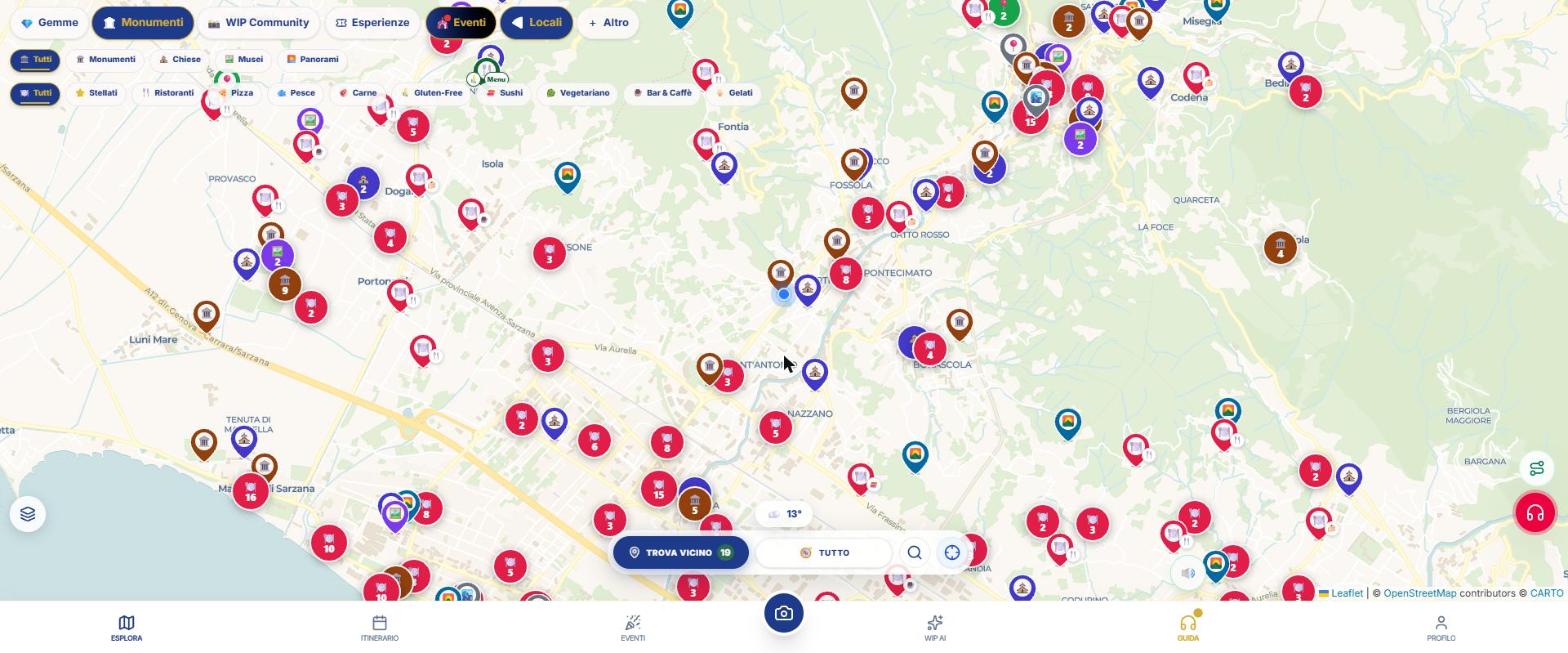
The filters that really exist
After turning on Locali (from the + More panel), a row appears under the bar with: All, ⭐ Starred, Restaurants, Pizza, Fish, Meat, 🌾 Gluten-Free, Sushi, Vegetarian, Bar & Café, Ice Cream.
Choices from different groups add up; within the same group either one applies.
Tutorial: reaching a gluten‑free restaurant
- Open WIP and tap the magnifying glass 🔍: type the city and choose the suggestion.
- Tap + More and turn on 🍕 Locali.
- In the filter row tap 🌾 Gluten-Free. A second row appears: 100% gluten‑free, With menu, Pizzerias, Ice Cream Shops, Bakeries.
- Choose the level you need. Tap ℹ️ Legend to understand what they mean.
- Tap a pin and then the panel again to open the card: look for the wording "Gluten-Free Available".
- Check address, phone and website, then tap Navigate to reach it on foot with WipNav or with Google Maps.
What the venue card shows
- Name, address, phone and website.
- Cuisine type, when noted (it’s information on the card, not a filter).
- Hours and notice if it is permanently closed.
- For starred venues: the Michelin distinction, any Green Star and the year, with a link to the official card.
- For locations with a gluten‑free diet: the "Gluten-Free Available" block.
Wine & Taste
The 🍷 Wine & Taste level (button "Map layers", bottom left) shows wineries, routes and shops and colors the DOP/IGP zones starting from a certain zoom. More details on the dedicated page.
What WIP does not do (so you know what to expect)
- There is no "vegan" filter: there is "Vegetarian". The vegan tag may appear as information on the venue’s card.
- There is no filter for cuisine type (Italian, Chinese, etc.): cuisine is a note on the card.
- WIP does not book tables.
Frequently asked questions
Can I trust gluten‑free restaurants for celiac disease?
WIP shows venues that declare the diet. It does not verify certifications or kitchen procedures: always contact the venue.
Can I filter by cuisine or by vegan?
No. The real filters are the ones listed above. Cuisine is information on the venue’s card.
How do I find the nearest bar or ice‑cream shop?
Turn on Places and choose "Bar & Café" or "Gelati": the map shows only those.
Continue with
Gluten-Free Restaurants
How to find restaurants, pizzerias, gelaterias and bakeries that are gluten-free with WIP: the levels (100% gl…
Starred Restaurants
How to search for restaurants with Michelin distinction on WIP: the Starred filter, the legend ★ ★★ ★★★ Bib an…
Wine & Taste
The "Wine & food" layer of WIP: wineries, shops, wine routes and DOP and IGP zones coloured on the map, with t…
Navigator
How to navigate with WIP: WipNav on foot with voice, tour with audioguides, custom route and opening in Google…
Content checked against the app code on 16 November 2026. If something does not match what you see, write to support@wip.guide.