WIP audio guides: discover places by listening to their story
With WIP you don’t look for an audio guide: turn on the Guide button and, while you walk or drive, the app notifies you when you’re approaching a place and tells its story when you arrive. You can also listen from the card of any place that has one.
Translated from Italian. Screenshots, videos and examples show the app in Italian.
Data updated on 15 November 2026. Luoghi visibili nell'app (esclusi nascosti e da rivedere). «circa» = stima del database, non conteggio esatto. Le sottocategorie dei ristoranti dipendono dai tag dichiarati in OpenStreetMap: indicano la presenza del tag, non una certificazione.
What you get: real examples
Files generated by the app for a real user, untouched: a big city and a smaller town. They are in Italian.
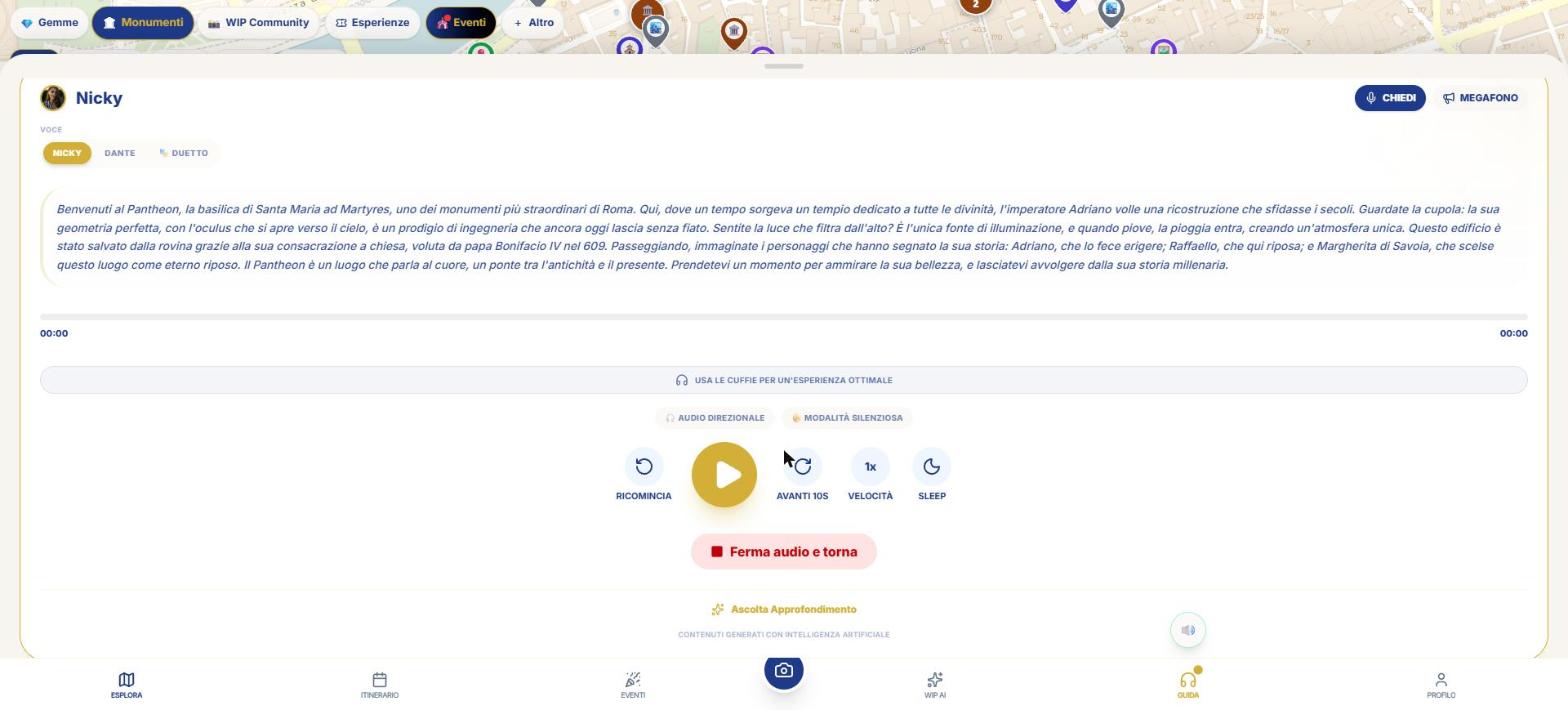
Large city · the real audio guide, as it starts when you arrive at the square (about 2 minutes).
Read the textSmaller center · discovered in 1989, the kit of doctor Eutyches (about 3 minutes).
Read the textStarts on its own
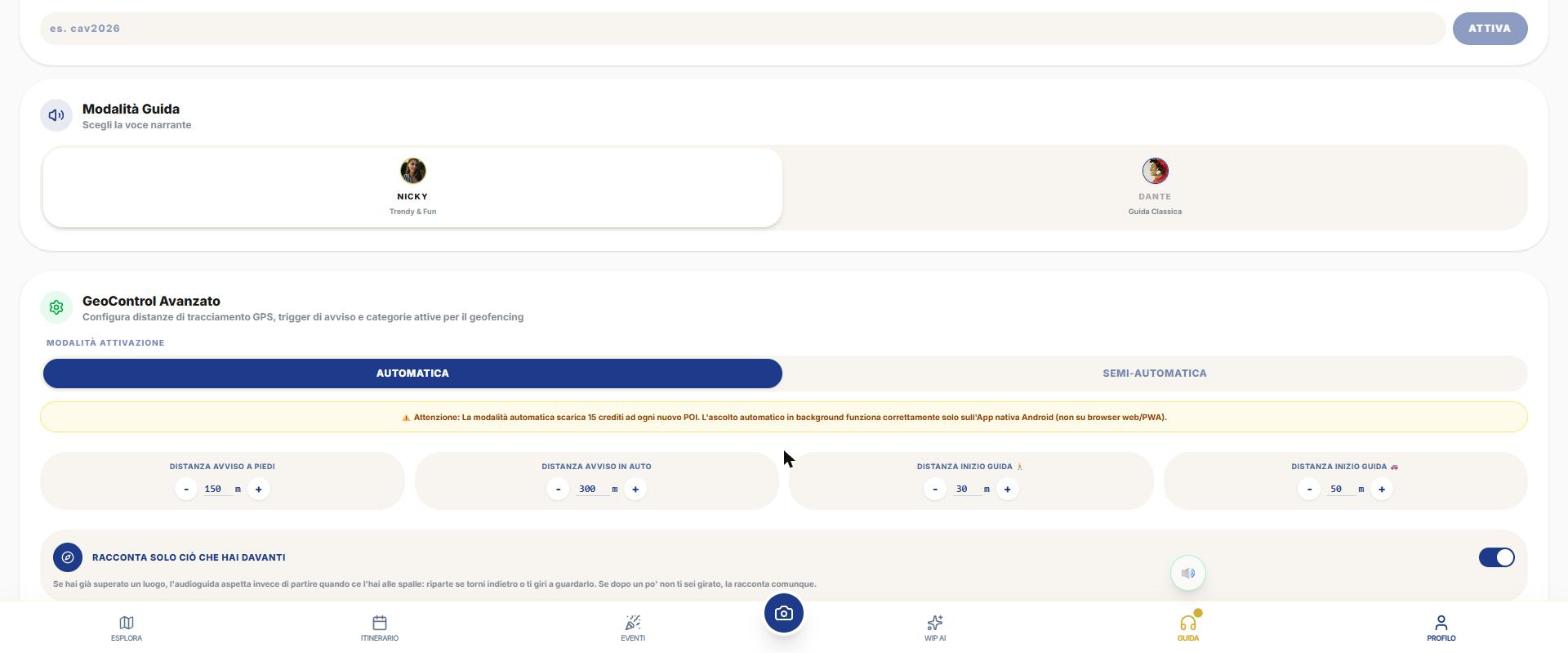
- Put on headphones and tap Guide in the bottom bar: it turns on the audio guide radar (the button above is for muting).
- Walk or drive. At about 150 m on foot (300 m by car) a alert with vibration arrives: "You are approaching …".
- Upon arrival (about 30 m on foot, 50 m by car) a short teaser audio plays, free of charge.
- Immediately after, the full guide starts.
Distances are yours: in Profile › SETUP › Advanced GeoControl you set the alert and guide start distances, on foot and by car separately. The mode isn’t chosen manually: the app detects it from speed (above 12 km/h switches to "car", below 6 km/h reverts to "on foot").
In Automatic Mode the full guide starts on its own; in Semi‑Automatic you receive the alert and teaser and you tap Listen yourself.
Which places speak
It depends on the Audio Guide Categories in Setup, not on the map chips. By default, Monuments and Castles, Museums and Galleries, Churches and Places of Worship are on; Panoramas, Nature and Tips are off. Gems always speak.
They don’t have audio guides: WIP Community, thematic categories (spas, cinema, skies, street art, markets, blossoms, memory, slow travel), Cultural Heritage, Locales, Utilities and Families.
Voices and languages
- Nicky: female voice, "Trendy & Fun" style (default). Dante: male voice, "Classic Guide". In the card you can also choose 🎭 Duet, a two‑voice dialogue.
- 7 languages: Italian, English, French, Spanish, German, Russian, Chinese.
- The texts are written based on on‑site sources (Wikipedia, Wikidata, official website) and synthetic voice: they are AI‑generated content from verified material.
Player controls
- Ask 🎤: pause and ask a question by voice or text; the character answers.
- Restart, Play/Pause, Forward 10 s, Speed, Sleep (10, 20 or 30 minutes).
- Listen to Deep Dive: up to 3 levels (historical details, curiosities, connections with art and culture).
- Resume from…: remembers where you left off.
- Silent mode 🤫: vibrates and shows the text without speaking.
- Tell only what’s in front of you: uses the phone’s compass to talk only about places in the direction you’re facing.
A place already listened to won’t restart for 24 hours; "Reset History" in Setup resets it. From Profile › ARCHIVE you can re‑listen to the guides you have.
How much does it cost
Offline and screen off
With the screen off and in background the audio guide works in the iPhone and Android app: the native service continues to follow your location. On the web it works only with the page open in the foreground. By downloading area packages you can use them without a network.
What WIP does not do (so you know what to expect)
- There is no demo player on this guide’s website: the audio is generated per location and can be listened to in the app or on the location’s page.
- If the full guide isn’t already cached, a network connection is needed to generate it.
Frequently asked questions
Can I change voice and language?
Yes: the voice (Nicky, Dante, or Duet) from the player or Setup, the language from the Profile settings.
Does the teaser cost anything?
No, the notice and teaser are free.
Does it work offline?
Yes, in the app, with downloaded area packages and, for full guides, an active Day Pass or guides already purchased.
Why doesn’t a guide start?
Check that the category is enabled in Setup, that the GPS is accurate (under 50 m), and that the location hasn’t already been narrated in the last 24 hours.
Continue with
Free and credits
What is free in WIP and what costs credits: place cards, map, Itinerary Library, teaser, WipNav; full audio gu…
Museums and culture
How to find museums, monuments, churches, castles and archaeological sites with WIP, and how to use the Museum…
Web, iPhone and Android
What changes when using WIP from the browser, iPhone or Android: screen off, offline, purchases, open maps, st…
Content checked against the app code on 16 November 2026. If something does not match what you see, write to support@wip.guide.