WIP › Guide › Restaurants and gastronomy › Starred Restaurants
Starred restaurants with WIP: where they are and what you find in the card
In the Places filter there is the ⭐ Starred option. The cards display the Michelin distinction with a cautious presentation, without reproducing guide reviews or prices.
Translated from Italian. Screenshots, videos and examples show the app in Italian.
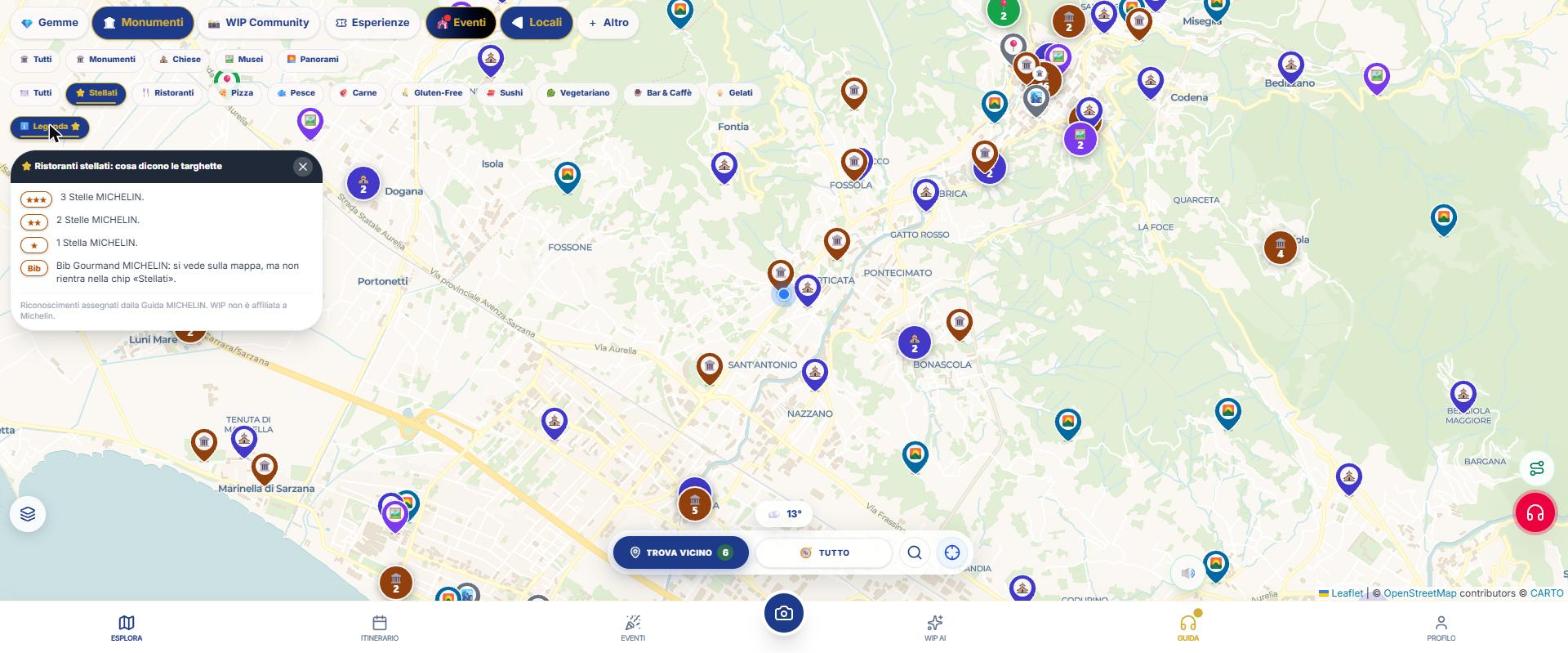
How to search
- Turn on 🍕 Places from the + More panel.
- Tap ⭐ Starred in the filter row.
- Tap Legend to see ★, ★★, ★★★ and Bib. The Bib Gourmand appears on the map but is not included in the "Starred" chip.
- Open a pin: the card shows the distinction, any Green Star and the year, with a link to the official card.
How the data are presented
The distinction is the one recorded in the venue archive and includes the year. WIP is not affiliated with Michelin: the card states this and does not include guide reviews or price ranges. To book and verify the current status, use the linked official website.
The Luxury level of the map also includes an entry "Starred Restaurants".
What WIP does not do (so you know what to expect)
- There is no table reservation.
- The data is what is saved in the archive: a new star or a lost star may not yet be updated. Check the indicated year.
Frequently asked questions
What does Bib mean?
It is the "Bib Gourmand" distinction from the Michelin guide. The app’s legend explains it next to the stars.
Does WIP show menu prices?
No, by design: the card links to the official website.
Continue with
Restaurants and gastronomy
How to find restaurants, pizzerias, bars, ice cream shops, gluten‑free, starred and wineries with WIP: real fi…
Gluten-Free Restaurants
How to find restaurants, pizzerias, gelaterias and bakeries that are gluten-free with WIP: the levels (100% gl…
Content checked against the app code on 16 November 2026. If something does not match what you see, write to support@wip.guide.