WIP › Guide › Itineraries › Podcast and Author Guide
Travel Podcast, Author Guide and Impossible Interview
After creating an itinerary you can turn it into a podcast to listen to, a PDF Author Guide and an audiobook. Here is every step, with costs and options.
Translated from Italian. Screenshots, videos and examples show the app in Italian.
What you get: real examples
Files generated by the app for a real user, untouched: a big city and a smaller town. They are in Italian.
Large city · in the app it is read by your phone’s voice; here an Italian Windows voice.
Read the textSmaller center · read by the phone’s voice.
Read the text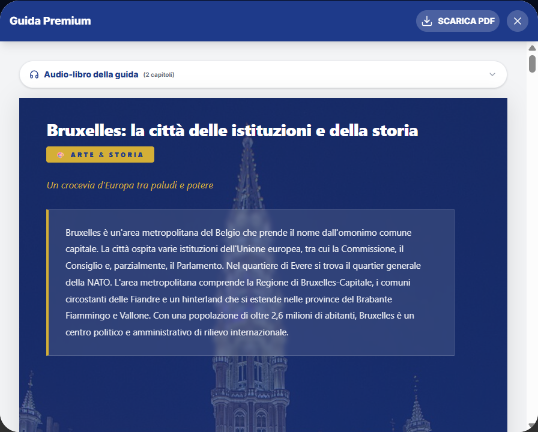
Large city · cover, city introduction and audio-book of the guide.
Large city · 9 pages with photos of the places.
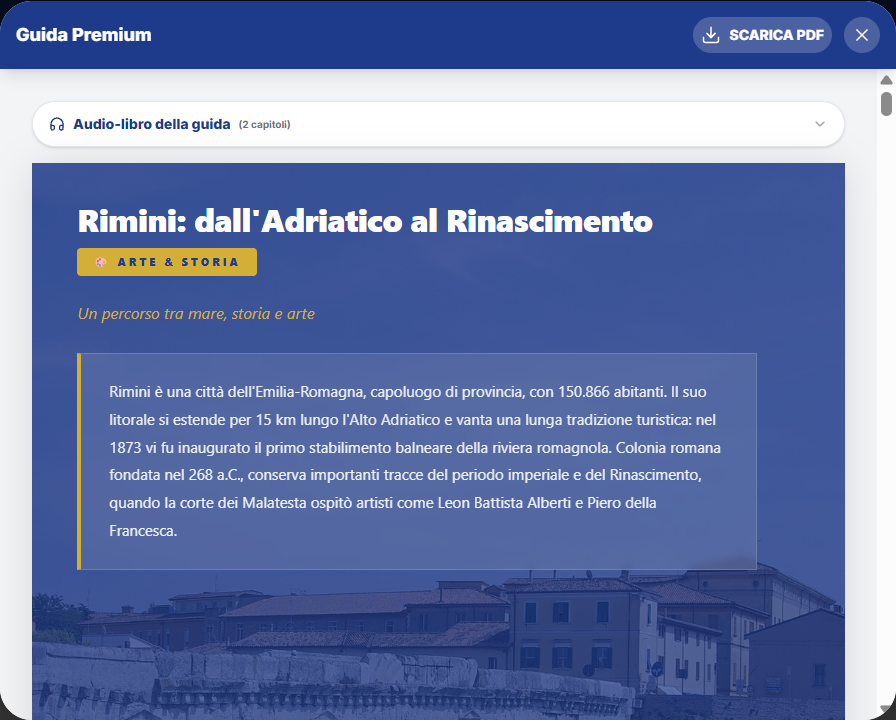
Smaller center.
Smaller center · 11 pages with photos of the places.
In short
| Product | Cost | What you get |
|---|---|---|
| Daily podcast | 15 credits per day | An episode read by your device's voice. Free to play again. |
| Author Guide | 20 credits per day | PDF guide for your itinerary, in 5 styles, via email and in your archive. |
| Guide EPUB | Free | The guide in electronic book format. |
| Guide translation | Half price (20 × days ÷ 2) | The guide in another language. Already translated: free. |
| Update a day | Free | Regenerate a single day after changing the itinerary. |
| Impossible Interview | 15 credits | Nicky interviews a historical figure from the destination. |
Tutorial: a day's podcast
- Open the itinerary (Itinerary › My Itineraries, or right after creating it).
- In the header of each day you'll find the amber “Podcast” button, next to “To the radar” and “Navigate”.
- Tap “Podcast”. If the day already has an episode, the button says “Play again” and doesn't ask for anything.
- Otherwise, the «AI Podcast» confirmation appears with the cost (15 credits) and your balance: Confirm.
- During creation, the button says «Generate...»; then playback starts with a mini-player: Pause/Resume, Stop, Restart from the beginning.
- A second tap on «Podcast» for the same day stops playback.
- How it sounds: the text is read by the phone's system voice in the app's language. With the Nicky Guide Mode, a female voice is preferred; with Dante, a male one.
- If the device has no voice, a warning appears and you won't be charged.
- If creation fails, your credits are refunded.
- Where to find it: reopening the itinerary, the button changes to «Play again».
Tutorial: Author's Guide
- On the itinerary result, tap «📖 Generate Author's Guide».
- Choose the narrative style (see the table below). The default is Essential.
- Optional: «🎁 Dedication» (up to 300 characters): it appears on the cover and the cost doesn't change.
- Optional: «Other email recipients»: up to 5 addresses, separated by a comma, semicolon, or space. They receive the guide in addition to you.
- Confirm the cost (20 credits × number of days) and accept the AI consent.
- The guide is placed in queue on the server (it can take up to 10 minutes). You can close the app: it arrives by email with the PDF and as a notification, and you'll find it in Profile › ITINERARIES › PREMIUM GUIDES and in My downloads › Premium Guides. Meanwhile, you can take a quiz.
- If the same guide (same itinerary, style, and language) already exists, it opens immediately free of charge.
| Style | What it focuses on |
|---|---|
| 🎨 Art & History | Critical analysis, architecture, and historical anecdotes |
| 👨👩👧👦 Family | Activities, games, and fun facts for kids of all ages |
| 🛍️ Shopping & Design | Artisanal boutiques, local design, and trends |
| 🍷 Food & Wine | Typical dishes, local producers, and culinary traditions |
| ⚡ Essential (default) | Hours, prices, access, and logistics |
When the guide is ready: the buttons
| Button | What it does |
|---|---|
| Share guide | Shares the link (or copies it). |
| 🎧 Podcast | The guide's podcast: 15 credits; replay is free. |
| 📖 EPUB | Download the guide in EPUB format, for free. |
| Regenerate | Return to style selection: this is a new paid generation. |
| Download PDF | Saves the PDF (named «WIP_title.pdf»). |
Audiobook, translation, and update of a day
Opening a saved guide (from Profile › PREMIUM GUIDES › OPEN GUIDE, or from the itinerary viewer) you'll find the «Guide audiobook» panel.
- Chapters: an introduction (history, culture, practical tips) and one per day («Day N · theme»). Each chapter has play/pause, estimated duration («~N min»), and Stop.
- Voice: by language (IT Elsa, EN Jenny, FR Denise, ES Elvira, DE Katja, RU Svetlana, ZH Xiaoxiao); the first reading prepares the voice (a few seconds), then it is immediate.
- «📖 Download EPUB»: free, the content is already yours.
- «🌍 Translate into…»: choose the language (excluding the current one), tap «Translate» and then Confirm: it costs half price; if the translation already exists it is free («no charge»).
- «Did you change the itinerary?»: choose Day N and tap Refresh: it regenerates that day for free.
Impossible Interview
In the audiobook panel there is «🎙️ Impossible Interview»: Nicky interviews a historical figure from your destination.
- Tap the amber button with the microphone: «Costs 15 credits: press again to confirm» appears.
- Tap again: «Looking for the guest and writing the interview…».
- You listen to the lines («On air with {guest} · line n/N»); Stop to stop.
Nicky speaks with a female voice and the guest with a male one. It cannot be downloaded or shared.
What WIP does not do (so you know what to expect)
- No downloading or sharing of the podcast and interview audio file.
- You cannot choose the duration or voice of the daily podcast.
- A podcast does not have a folder in downloads.
Frequently asked questions
Does the podcast use a real voice?
It uses your device's system voice in the app's language.
Do I lose credits if the guide doesn't arrive?
No: if generation fails, the server refunds.
Can I have the guide in another language?
Yes, with «Translate into…» at half price.
Continue with
Itineraries
How to create an itinerary with WIP: days, budget, pace, stops, times, public transport, rain Plan B, PDF and …
How to buy
How to purchase credits in WIP from web, iPhone and Android, the packages, the balance, the passes (Day Pass, …
Archive, downloads and points
How Archive (listenings), My downloads (5 folders), XP points, levels, Missions, loading quizzes, Passport and…
Content checked against the app code on 16 November 2026. If something does not match what you see, write to support@wip.guide.