WIP › Guide › Archive, downloads and points
Archive, My downloads, points, missions and quizzes
Here you can find where to retrieve everything you have done (Archive and downloads) and how to earn points and credits (XP, Missions, quizzes).
Translated from Italian. Screenshots, videos and examples show the app in Italian.
Archive: your listenings
The ARCHIVE tab in the Profile is the listening history of the audioguides, grouped by date. It does not contain downloads.
- Each card shows photo, category, name and time.
- Re-listen (already purchased): you re-listen for free to a guide you already have.
- The trash can removes the listening from the history (asks for confirmation).
- «Unavailable» if the place no longer exists.
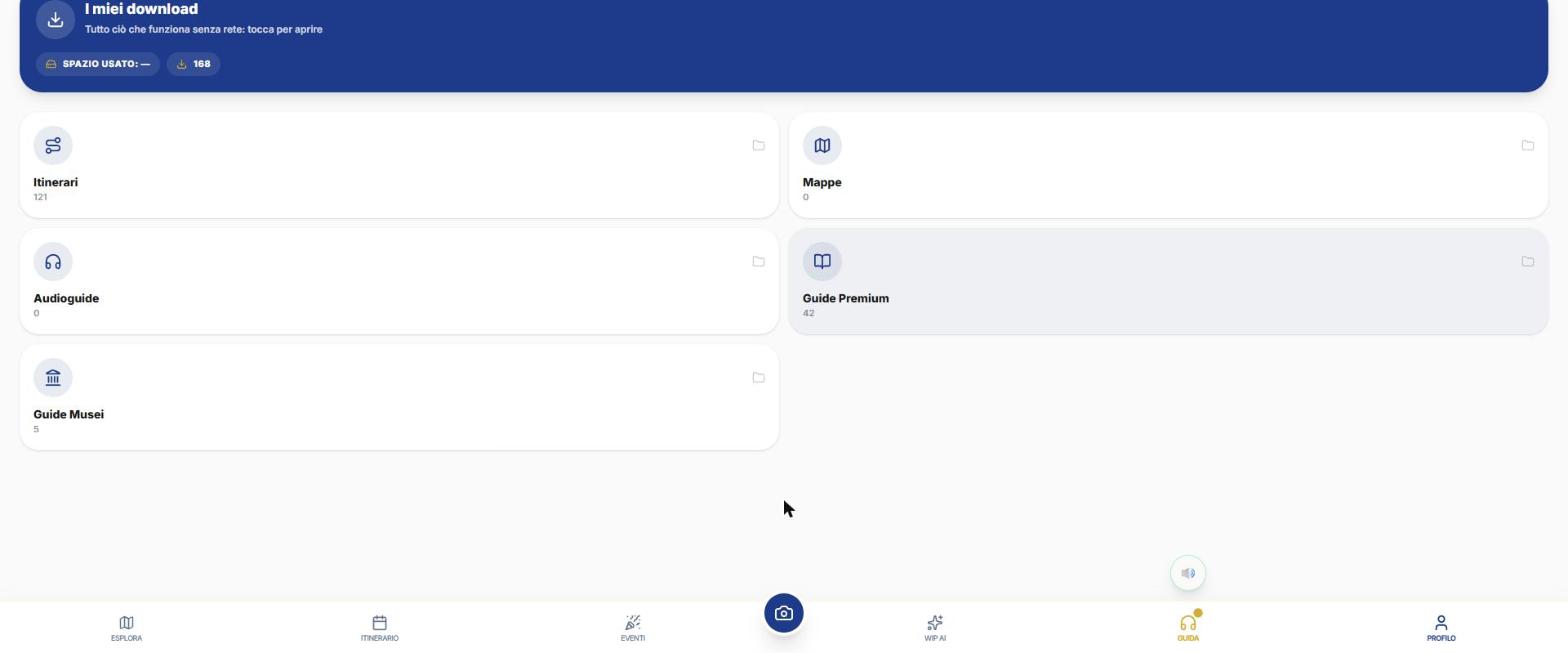
My downloads: the five folders
It opens from Profile › My downloads, from Itinerary › My Itineraries and from Itinerary › Offline: it is always the same archive. At the top you see «Storage used». In each folder you can sort by Date or Name and choose list or grid view.
| Folder | What it contains | Buttons on each row |
|---|---|---|
| Itineraries | Itineraries downloaded or on your account. Indicators: Map ✓/✗, Navigation ✓/✗, audioguides done/total, size, PDF. | Navigate · Story · PDF · Delete; «Download» (if only on account); «Completa download» (if incomplete) |
| Maps | Areas downloaded for offline use: choose a city and a radius (up to 62 miles). | Open on map · Update (changes only) · Delete from device |
| Audio guides | «Audio guides you listened to» (takes you to the Archive) and downloaded guides. | Tap to open |
| Premium Guides | Author Guides. | PDF · Download |
| Museum Guides | Paid museum tours. | PDF · Download · Delete |
- Badge: «Ready offline» (green), «Incomplete» (amber), «In your account» (blue).
- Printed PDFs appear at the bottom of the folder.
- Reopening a download does not use credits or passes.
- Offline maps are free: you only pay to listen to audio guides.
XP points, levels and Quests
| Action | Points |
|---|---|
| Open the details of a place you've never explored before | +5 XP («Explored Place!») |
| Listen to an audio guide | +10 XP |
| Scan a place with Vision | +10 XP |
| Correct answer to a quiz | >+20 XP and +1 credit |
The Quests tab shows the level ring (current and missing XP, «Level reward: +n credits»), the «Level Rewards» carousel and the «Exploration Achievements» (for example «Visit n places» in a category, with progress bar and credit reward). Level rewards don't arrive automatically: tap «CLAIM REWARDS». Credits earned do not expire and are spent first. You can find the level thresholds in the app.
The quiz
While waiting for generation (itinerary or Author Guide), a quiz appears: 4-choice questions about travel and places, with a 4-second explanation after each answer. At the end: «Quiz Completed! … Won: credits and XP». «Skip» closes it and the points earned are still awarded. The questions are not about your destination.
Diary and Passport
- DIARY (Profile): places listened to, cities in your passport, Vision snaps, listens from the last 6 months.
- Trip health (app only): steps, km and floors, last 7 days.
- Your year in travel: cities visited and your «favorite place»; «Share» creates an image.
- WIP Passport: one stamp per destination, with the date of your first visit; «Share the passport».
Rain guarantee
- Open Profile › ITINERARIES › AI: on itineraries created in the last 7 days you will see «🌧 Did it rain? Rain guarantee».
- Choose the day («Which day did it rain?»).
- Tap «Verify and claim refund».
If it rained at least 6 hours or 20 mm on that day (Open-Meteo data), we will refund that day's credits. It's once per itinerary day, with no receipts needed. If weather data is not yet finalized, try again in a couple of days.
What WIP does not do (so you know what to expect)
- There are no leaderboards.
- The badge catalog cannot be viewed.
- The quiz only appears during loading, not while you explore the map.
Frequently asked questions
How do I earn credits?
With quizzes (1 credit per correct answer), Missions, level rewards, and approved photos in the WIP Community.
Where can I find a guide I've already listened to?
In Profile › ARCHIVE: «Listen again (already purchased)».
What happens if I don't claim a reward?
It stays pending until you tap «CLAIM REWARDS».
Continue with
Profile and Setup
All Profile tabs and all WIP Setup options: initial map, notifications, permissions, data usage, security, lan…
How to buy
How to purchase credits in WIP from web, iPhone and Android, the packages, the balance, the passes (Day Pass, …
Vision
How to use WIP Vision: AI Scan (Place, Artwork, Nature), AR Radar, costs, photos from the gallery, candidates,…
Content checked against the app code on 16 November 2026. If something does not match what you see, write to support@wip.guide.