WIP › Guide › Itineraries › Edit an itinerary
Edit an itinerary: replace, lock, add a day, Plan B
After generation you can change almost everything, stop by stop. Here’s each button, what it does and how much it costs.
Translated from Italian. Screenshots, videos and examples show the app in Italian.
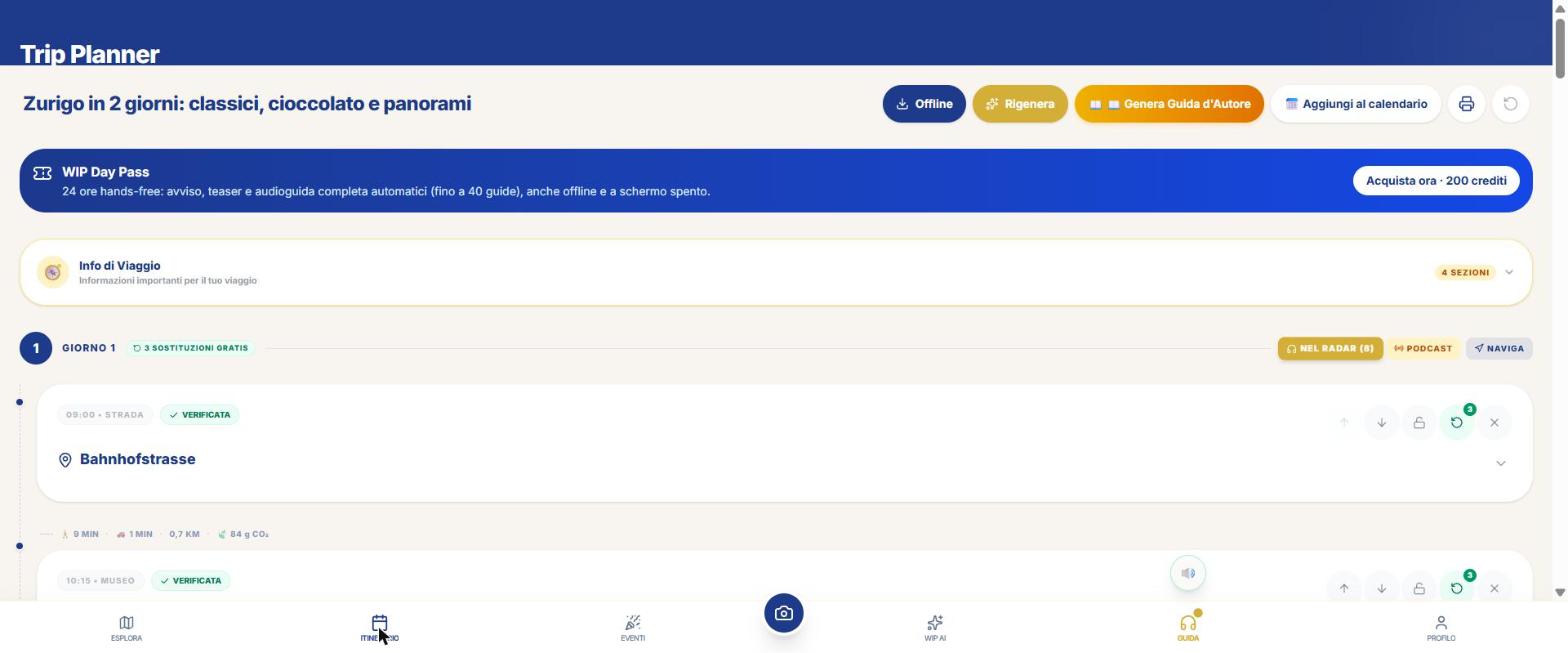
The top buttons
| Button | What it does | Cost |
|---|---|---|
| Offline | Save the itinerary for offline use. | Text and map free; audio bundle 20 credits per stop. |
| Regenerate | Regenerate **all** while keeping the stops **locked**. | 10 × days, with confirmation |
| 📖 Generate Author Guide | PDF guide of your itinerary. | 20 per day |
| Calendar | Export to .ics (asks for the date). | Free |
| Print / PDF | PDF with map and legend. | Free |
| ↺ | Reset and restart. | Free |
For each day
- Badge \"N sostituzioni gratis\": each day it has 3 free.
- 🌧 Plan B: the badge \"N mm\" appears if the forecast is at least 1 mm. The button asks for an indoor alternative (museums, churches, galleries instead of outdoors); lunch and dinner remain the same. See the preview and confirm. No cost; access is required.
- In the radar (N): brings the stops into the Radar for the tour with audio guide.
- Podcast / Replay: the day's podcast.
- Navigate: opens navigation.
For each stop
| Button | What it does |
|---|---|
| Move up / Move down | Swap the stops. **There is no dragging**, and each position **keeps its time**. Saves itself. |
| 🔒 Lock stop | The stop stays when you press **Regenerate**. |
| Replace | Change the stop to an alternative. **3 free per day**, then **8 credits** with confirmation; if it fails, it consumes nothing. |
| ✕ Delete | Removes the stop (asks for confirmation). |
| 🚇 Transport | For routes of 1.5 km or more: Google Maps with public transport. |
| Badge ✓ / ⚠ | Result of the automatic stop verification. |
Add a stop manually
- At the end of the day, tap \"Add manual stop\".
- Fill in: time and name (required), type (visit, restaurant, break, transfer), duration, description, location and tips.
- Optional: \"Suggest with AI\" (8 credits).
- Tap Save: the stop is inserted in chronological order.
Add a day or a day trip
- On a saved itinerary, at the bottom tap \"➕ Add a day\" or \"➕ Nearby stop (day trip)\".
- For the trip: "Search a nearby city…".
- Choose the theme of the day: Classic, Gastronomic, Families, Hidden, Art and history, Relax and scenery, or ✨ Surprise me.
- Tap "Generate (12 credits)" and confirm.
- If the day comes from the Library, the server refunds half (6 credits): "Day added (from Library, half price)".
- Beyond 15 km the server adds two transfer stops (outbound and return) with km and minutes.
What WIP does not do (so you know what to expect)
- You can't remove a whole day.
- There is no dragging of stops.
- Plan B doesn't change lunch and dinner.
Frequently asked questions
How many free substitutions do I have?
3 per day; then 8 credits each.
If I move a stop does the time change?
No: the positions keep their time.
Continue with
Itineraries
How to create an itinerary with WIP: days, budget, pace, stops, times, public transport, rain Plan B, PDF and …
Create an itinerary
The 10 entries of WIP's Trip Planner: Talk to WIP, When to go, Automatic Mode, Favorites, Radius, Swip, Group …
Podcast and Author Guide
How to generate each day's travel podcast, the PDF Author Guide, the audiobook, the free EPUB, the translation…
Content checked against the app code on 16 November 2026. If something does not match what you see, write to support@wip.guide.