The WIP interface explained: bar, chips, buttons
A visual guide to the controls: where everything is and what it does when you tap it.
Translated from Italian. Screenshots, videos and examples show the app in Italian.
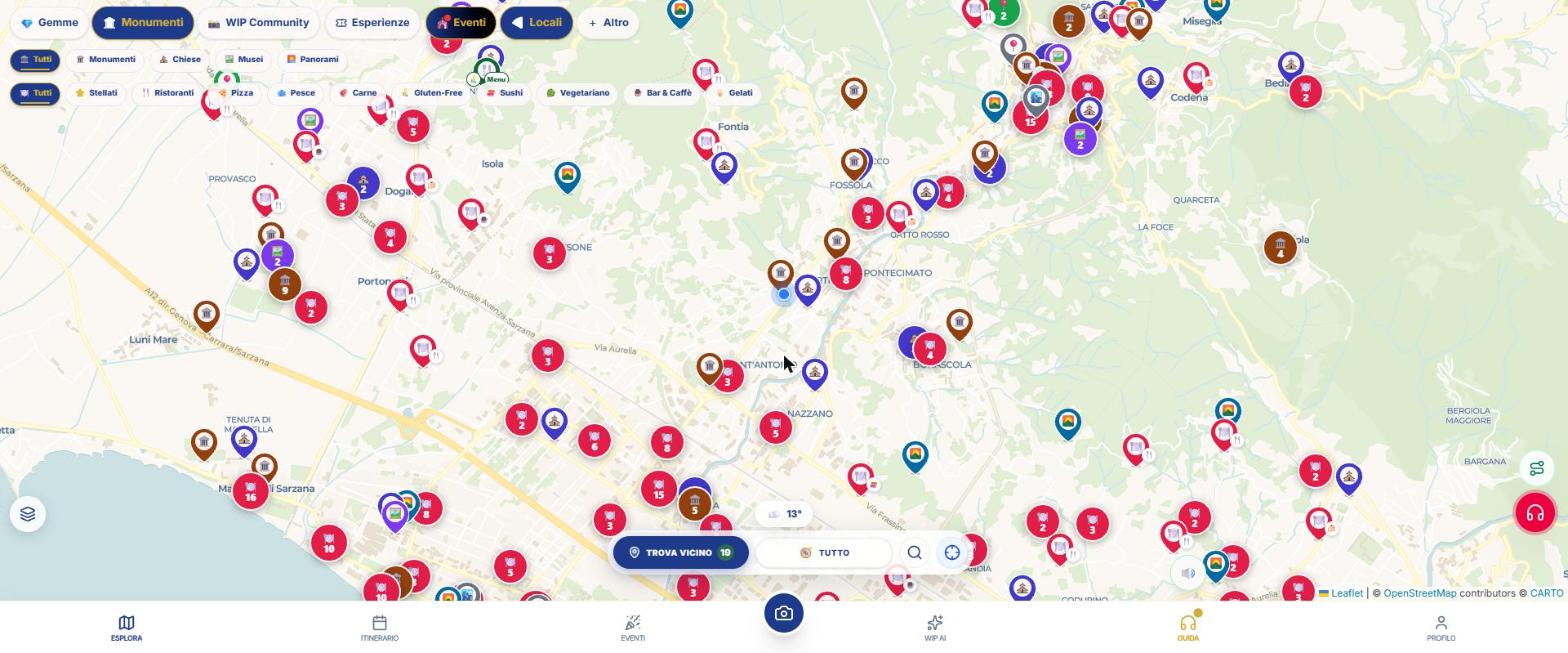
The bottom bar
| Entry | What it does |
|---|---|
| Explore | The map with places and levels. |
| Itinerary | Create, open, and download itineraries; Library; group travel. |
| Events | Events, exhibitions, and seasonal content. |
| Camera button | Vision: recognizes places, artworks, nature; AR Radar; Museum visits. |
| WIP AI | Chat with the assistant (3 credits every 10 messages). |
| Guide | Turns the audio guide radar on or off; the button above mutes it. |
| Profile | Settings, credits, Shop, price list, archive, manual, group tour. |
At the top of the map
- Category chips: Gems, Monuments, WIP Community, Experiences, Events; use + More to add Nature, Places, Venues, Utilities, Families, Cultural Heritage, Themed.
- Sub-chips: these appear below the bar when the chip is turned on and refine your search (for example Churches, Museums, Viewpoints).
On the map
- Layers (bottom left): trails, cycle paths, wine and food, snow, sun, climate, sea quality, satellite, and more.
- Lens 🔍: search for a city.
- Crosshairs: centers on your location; hold down to make the map follow you.
- Weather indicator at the bottom center: temperature and, if it is raining, an alert.
- Numbered pins: multiple nearby places grouped together; zoom in to separate them.
Continue with
First 5 minutes
For those opening WIP for the first time: five steps to view the map, find a place, listen to a guide, and und…
Map and search
How to use the WIP map: category chips, layers, city search, location, weather and place card with photos, des…
Glossary
Gems, teasers, Day Pass, credits, radar, tour, WipNav, GeoControl: the meaning of every word used in WIP.…
Content checked against the app code on 16 November 2026. If something does not match what you see, write to support@wip.guide.